
| 일 | 월 | 화 | 수 | 목 | 금 | 토 |
|---|---|---|---|---|---|---|
| 1 | 2 | |||||
| 3 | 4 | 5 | 6 | 7 | 8 | 9 |
| 10 | 11 | 12 | 13 | 14 | 15 | 16 |
| 17 | 18 | 19 | 20 | 21 | 22 | 23 |
| 24 | 25 | 26 | 27 | 28 | 29 | 30 |
| 31 |
- union-find
- 손실 함수
- dijkstra
- 딥러닝
- 베버의 법칙
- 계단 함수
- vanishing gradient
- 경사하강법
- 백준
- 베르누이 분포
- 다익스트라
- Perceptron
- feedforward neural network
- 동적계획법
- 3d
- 범용 근사 정리
- BOJ
- 알고리즘
- 이진분류
- 과대적합
- dl
- bfs
- 이진 분류
- 단층 퍼셉트론
- DP
- 순방향 신경망
- OpenGL
- c++
- deep learning
- 기울기 소실
- Today
- Total
Hello COCOBALL!
[LearnOpenGL] 29. Advanced GLSL 본문
GLSL’s built-in variables
shader는 파이프라이닝 되어 있기 때문에 shader 밖의 다른 데이터가 필요한 경우에 데이터를 전달해야 한다.
데이터 전달 방식에는 vertex attributes, uniforms, samplers 등이 있고, 추가로 gl_ 접두사로 시작하는 내장 변수가 있다.(gl_Position, gl_FragCoord)
Vertex shader variables
1. gl_PointSize
OpenGL의 glPointSize 함수를 사용하여 설정할 수 있지만, vertex shader에서도 설정이 가능하다.
float 타입의 출력 변수이고 point의 너비와 높이를 픽셀 단위로 설정이 가능하다.
vertex shader에서 point size를 설정하면 vertex 마다 point 값을 설정할 수 있다.
vertex shader에서의 point size 조절은 기본적으로 비활성화 되어 있기 때문에 활성화 시킨다.
glEnable(GL_PROGRAM_POINT_SIZE);
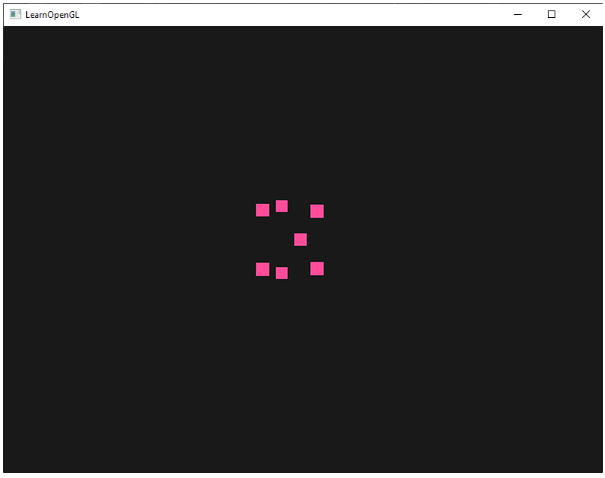
example) clip-space의 z값과 pointsize를 동일하게 할 경우 멀리 있는 점일수록 더 크게 보인다.
void main()
{
    gl_Position = projection * view * model * vec4(aPos, 1.0);
    gl_PointSize = gl_Position.z;
}
2. gl_VertexID
int 타입의 입력 변수이다.
우리가 지금 그리고 있는 vertex의 ID를 가지고 있다.
glDrawElements를 이용해 그림을 그릴 때는 현재 그림을 그리는 중인 vertex의 인덱스를 저장하고, glDrawArrays로 인덱스 없이 그림을 그릴 때는 렌더링 명령의 시작으로부터 현재까지 처리된 vertex의 개수가 저장된다.
Fragment shader variables
1. gl_FragCoord
gl_FragCoord 벡터의 z값이 깊이 값과 같기 때문에 depth testing을 다룰 때 사용한 변수이다.
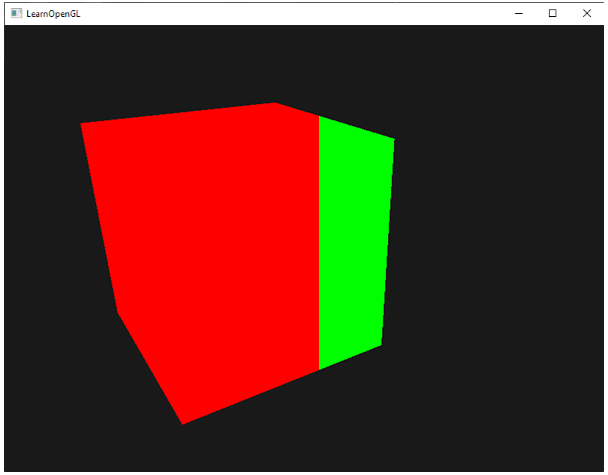
x,y 요소는 fragment의 screen-space coordinate이다. (좌측 하단부터 시작)
우리는 윈도우 창의 크기를 800*600으로 설정했기에 x값은 0~800, y값은 0~600의 값을 가진다.
사용 예시
void main()
{
    if(gl_FragCoord.x < 400)
        FragColor = vec4(1.0, 0.0, 0.0, 1.0);
    else
        FragColor = vec4(0.0, 1.0, 0.0, 1.0);
}
2. gl_FrontFacing
bool 타입의 입력 변수이다. (true : front face, false : otherwise)
face culling을 사용하지 않는다면 gl_FrontFacing 변수가 우리에게 현재 fragment가 전면인지 후면인지 알려준다.
#version 330 core
out vec4 FragColor;

in vec2 TexCoords;

uniform sampler2D frontTexture;
uniform sampler2D backTexture;

void main()
{
    if(gl_FrontFacing)
        FragColor = texture(frontTexture, TexCoords);
    else
        FragColor = texture(backTexture, TexCoords);
}

3. gl_FragDepth
출력 변수이고, shader 내에서 fragment의 depth 값을 수동으로 설정할 수 있다.
depth 값을 설정할 때 0.0~1.0 사이의 값을 작성하고, 만약 gl_FragDepth가 없다면 gl_FragCoord.z 값이 자동으로 depth 값이 된다.
직접 depth 값을 설정하기 때문에 early depth testing은 비활성화 되고, 성능이 비교적 안 좋아지는 단점이 있다.
하지만 OpenGL 4.2 버전부터 우리는 fragment shader의 시작 지점에 depth condition과 함께 gl_FragDepth를 재정의 함으로써 둘 사이를 조정할 수 있다.
layout (depth_<condition>) out float gl_FragDepth;
condition이 가질 수 있는 값들

#version 420 core // note the GLSL version!
out vec4 FragColor;
layout (depth_greater) out float gl_FragDepth;

void main()
{
    FragColor = vec4(1.0);
    gl_FragDepth = gl_FragCoord.z + 0.1;
}
Interface blocks
지금까지는 vertex→fragment shader로 정보를 보내고 싶을 때 양쪽에 입력/출력 변수들을 선언했다.
이는 정보를 보내는 가장 쉬운 방식이지만 보낼 데이터가 많아지면 응용 프로그램의 크기가 커진다.
OpenGL은 이 변수들을 조직화 하는 interface blocks 라는 것을 제공한다.
#version 330 core
layout (location = 0) in vec3 aPos;
layout (location = 1) in vec2 aTexCoords;

uniform mat4 model;
uniform mat4 view;
uniform mat4 projection;

out VS_OUT
{
    vec2 TexCoords;
} vs_out;

void main()
{
    gl_Position = projection * view * model * vec4(aPos, 1.0);
    vs_out.TexCoords = aTexCoords;
}
vs_out처럼 모든 출력 변수들을 묶는다.
interface block을 통해 shader의 입출력을 체계화 할 수 있다.
fragment shader에서는 입력 interface block을 선언해야 하는데, 이름은 vertex shader에서와 같아야 하지만 별명은 임의로 설정이 가능하다.
#version 330 core
out vec4 FragColor;

in VS_OUT
{
    vec2 TexCoords;
} fs_in;

uniform sampler2D texture;

void main()
{
    FragColor = texture(texture, fs_in.TexCoords);
}
각각의 interface block의 이름이 같기 때문에 상응하는 입출력 변수들이 매칭된다.
Uniform buffer objects
여러 개의 shader 에서 동일하게 사용할 수 있는 uniform 변수의 모음이다.
uniform buffer objects를 사용하면 관련된 uniform 변수는 GPU 메모리에 한 번만 설정해야 한다.
다른 버퍼들과 같기 때문에 버퍼 생성 후 GL_UNIFORM_BUFFER에 바인딩 할 수 있고, 연관된 uniform 변수들을 버퍼에 저장할 수 있다.
projection, view 행렬을 uniform block에 저장
#version 330 core
layout (location = 0) in vec3 aPos;

layout (std140) uniform Matrices
{
    mat4 projection;
    mat4 view;
};

uniform mat4 model;

void main()
{
    gl_Position = projection * view * model * vec4(aPos, 1.0);
}
uniform block 안에 있는 행렬들은 접두사로 block 이름을 사용하지 않고 바로 접근이 가능하다.
layout(std140)의 의미는 현재 정의된 uniform block은 지정된 메모리 layout을 사용한다는 뜻이다.
다음 코드는 uniform block layout을 설정한다.
Uniform block layout
uniform block 내의 내용은 GPU 메모리의 예약된 공간에 불과한 buffer object에 저장된다.
이 메모리가 어떤 종류의 정보를 가지고 있는지에 대한 정보가 없기 때문에 OpenGL에게 메모리의 어떤 부분이 어떤 shader의 어느 uniform 변수에 해당하는지 알려줘야 한다.
layout (std140) uniform ExampleBlock
{
    float value;
    vec3  vector;
    mat4  matrix;
    float values[3];
    bool  boolean;
    int   integer;
};
우리는 size와 offset을 알고싶고, 버퍼에 순서대로 배치할 수 있다.
OpenGL은 변수들 사이의 간격(spacing)을 명시하지 않고, 이는 하드웨어가 변수들을 적합한 위치에 배치할 수 있도록 한다. 이는 좋은 기능이지만 불편하다.
기본적으로 GLSL은 shared layout이라 불리는 uniform 메모리 layout을 사용한다.
shared layout은 변수들의 순서를 유지한 채 최적화를 위해 uniform 변수들을 다시 위치 시킬 수 있다.
각 uniform 변수들이 가지는 offset을 glGetUniformindices를 통해 확인할 수 있지만 우리가 목표하는 바가 아니다.
std140 layout은 특정한 규칙에 의해 정의된 offset에 의해 layout을 표준화 한다.
그렇기 때문에 우리는 각각의 변수들에 대한 offset을 수작업으로 얻을 수 있다.
각각의 변수는 여백을 포함하여 변수가 가질 수 있는 공간인 base alignment를 가진다.
가장 많이 쓰이는 규칙들

ExampleBlock의 변수들에 대한 offset
layout (std140) uniform ExampleBlock
{
                     // base alignment  // aligned offset
    float value;     // 4               // 0
    vec3 vector;     // 16              // 16  (16의 배수여야하므로 4->16)
    mat4 matrix;     // 16              // 32  (0 열)
                     // 16              // 48  (1 열)
                     // 16              // 64  (2 열)
                     // 16              // 80  (3 열)
    float values[3]; // 16              // 96  (values[0])
                     // 16              // 112 (values[1])
                     // 16              // 128 (values[2])
    bool boolean;    // 4               // 144
    int integer;     // 4               // 148
};
Using uniform buffers
먼저 glGenBuffers 함수를 통해 uniform buffer object를 생성하고, GL_UNIFORM_BUFFER에 바인딩한 후에 glBUfferData 함수를 호출하여 충분한 메모리를 할당한다.
unsigned int uboExampleBlock;
glGenBuffers(1, &uboExampleBlock);
glBindBuffer(GL_UNIFORM_BUFFER, uboExampleBlock);
glBufferData(GL_UNIFORM_BUFFER, 152, NULL, GL_STATIC_DRAW); // 152 바이트 메모리 할당
glBindBuffer(GL_UNIFORM_BUFFER, 0);
이제 버퍼에 데이터를 삽입, 수정할 때 uboExampleBlock을 바인딩하여 glBufferSubData를 통해 메모리를 수정한다.
한 번만 uniform buffer를 업데이트 하면 이 버퍼를 사용하는 모든 shader에서의 uniform 값들이 업데이트 된다.
어떤 uniform buffer가 어떤 uniform block에 해당하는지 어떻게 아는가?
→ OpenGL에는 uniform buffer를 연결할 수 있도록 정의된 binding points가 있다.
uniform buffer를 생성하면 이를 binding points 중 하나에 연결하고, 같은 곳에 shader의 uniform block을 연결한다.

다음 그림에서 볼 수 있듯이, 여러 uniform buffer를 여러 biniding points에 연결할 수 있다.
glUniformBlockBinding 함수를 통해 shader의 uniform block을 특정한 binding point에 연결한다.
unsigned int lights_index = glGetUniformBlockIndex(shaderA.ID, "Lights");
glUniformBlockBinding(shaderA.ID, lights_index, 2);
glGetUniformBlockIndex parameters
- program object
- name of the uniform
glUniformBlockBinding parameters
- program object
- uniform block index
- binding point to link to
uniform block index는 shader에서 정의된 uniform block의 location index이고, glGetUniformBlockIndex 함수를 호출하여 접근할 수 있다.
다음 작업은 각각의 shader마다 수행 되어야 한다.
또한 uniform buffer object를 동일한 binding point에 바인딩 해야 하고, 이는 glBindBufferBase 혹은 glBindBufferRange에 의해 수행될 수 있다.
glBindBufferBase(GL_UNIFORM_BUFFER, 2, uboExampleBlock);
// or
glBindBufferRange(GL_UNIFORM_BUFFER, 2, uboExampleBlock, 0, 152);
glBindBufferBase parameters
- target
- binding point index
- uniform buffer object
glBindBufferRange parameters
- target
- binding point index
- uniform buffer object
- offset
- size parameter
boolean 타입의 uniform 변수를 업데이트
glBindBuffer(GL_UNIFORM_BUFFER, uboExampleBlock);
int b = true; // GLSL에서 bool은 4바이트로 표현되므로 integer 타입으로 저장합니다
glBufferSubData(GL_UNIFORM_BUFFER, 144, 4, &b);
glBindBuffer(GL_UNIFORM_BUFFER, 0);
A simple example
#version 330 core
layout (location = 0) in vec3 aPos;

layout (std140) uniform Matrices
{
    mat4 projection;
    mat4 view;
};
uniform mat4 model;

void main()
{
    gl_Position = projection * view * model * vec4(aPos, 1.0);
}
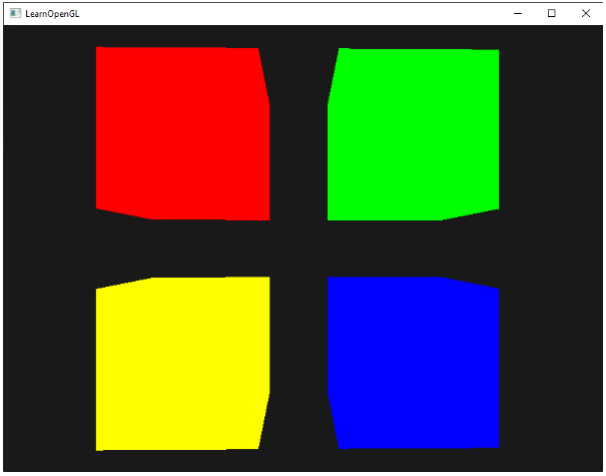
model 행렬만 자주 변경되고 projection, view는 그렇지 않기 때문에 projection, view만 uniform block에 저장한다. (자주 변경되면 uniform block을 사용함으로써 이득을 볼 수 없음)
먼저 uniform block의 binding point를 0으로 설정한다.(각 shader마다 수행되어야 함)
unsigned int uniformBlockIndexRed    = glGetUniformBlockIndex(shaderRed.ID, "Matrices");
unsigned int uniformBlockIndexGreen  = glGetUniformBlockIndex(shaderGreen.ID, "Matrices");
unsigned int uniformBlockIndexBlue   = glGetUniformBlockIndex(shaderBlue.ID, "Matrices");
unsigned int uniformBlockIndexYellow = glGetUniformBlockIndex(shaderYellow.ID, "Matrices");

glUniformBlockBinding(shaderRed.ID,    uniformBlockIndexRed, 0);
glUniformBlockBinding(shaderGreen.ID,  uniformBlockIndexGreen, 0);
glUniformBlockBinding(shaderBlue.ID,   uniformBlockIndexBlue, 0);
glUniformBlockBinding(shaderYellow.ID, uniformBlockIndexYellow, 0);
uniform buffer object를 생성하고 binding point 0에 바인딩한다.
unsigned int uboMatrices
glGenBuffers(1, &uboMatrices);

glBindBuffer(GL_UNIFORM_BUFFER, uboMatrices);
glBufferData(GL_UNIFORM_BUFFER, 2 * sizeof(glm::mat4), NULL, GL_STATIC_DRAW);
glBindBuffer(GL_UNIFORM_BUFFER, 0);

glBindBufferRange(GL_UNIFORM_BUFFER, 0, uboMatrices, 0, 2 * sizeof(glm::mat4));
projection, view 행렬 저장
glm::mat4 projection = glm::perspective(glm::radians(45.0f), (float)width/(float)height, 0.1f, 100.0f);
glBindBuffer(GL_UNIFORM_BUFFER, uboMatrices);
glBufferSubData(GL_UNIFORM_BUFFER, 0, sizeof(glm::mat4), glm::value_ptr(projection));
glBindBuffer(GL_UNIFORM_BUFFER, 0);

glm::mat4 view = camera.GetViewMatrix();
glBindBuffer(GL_UNIFORM_BUFFER, uboMatrices);
glBufferSubData(GL_UNIFORM_BUFFER, sizeof(glm::mat4), sizeof(glm::mat4), glm::value_ptr(view));
glBindBuffer(GL_UNIFORM_BUFFER, 0);
glBindVertexArray(cubeVAO);
shaderRed.use();
glm::mat4 model = glm::mat4(1.0f);
model = glm::translate(model, glm::vec3(-0.75f, 0.75f, 0.0f)); // top-left
shaderRed.setMat4("model", model);
glDrawArrays(GL_TRIANGLES, 0, 36);
// ... draw Green Cube
// ... draw Blue Cube
// ... draw Yellow Cube
Uniform buffer object의 장점
- 많은 uniform들을 각각 설정하는 것 보다 한번에 설정하기에 더 빠르다.
- 같은 uniform 변수들이 여러개의 shader에 있을 때, 수정이 용이하다.
- 많은 uniform을 사용할 수 있다.
- OpenGL은 관리할 수 있는 uniform의 개수 제한이 있는데(GL_MAX_VERTEX_UNIFORM_COMPONENTS를 통해 확인 가능), uniform buffer objects를 사용하면 제한은 매우 높아진다.
'OpenGL' 카테고리의 다른 글
| 베버의 법칙(Weber's law)이란? (0) | 2022.09.09 |
|---|---|
| [LearnOpenGL] 28. Advanced Data (0) | 2022.08.22 |
| [LearnOpenGL] 27. Cubemaps (0) | 2022.08.22 |
| [LearnOpenGL] 26. Framebuffers (0) | 2022.08.22 |
| [LearnOpenGL] 25. Face culling (0) | 2022.08.22 |


